Wearable guidance for using everyday touchscreens independently.
Focus
Accessible touchscreen interaction
Method
Secondary research
Team
Team project
Read time
Estimating…
Project length
Ongoing
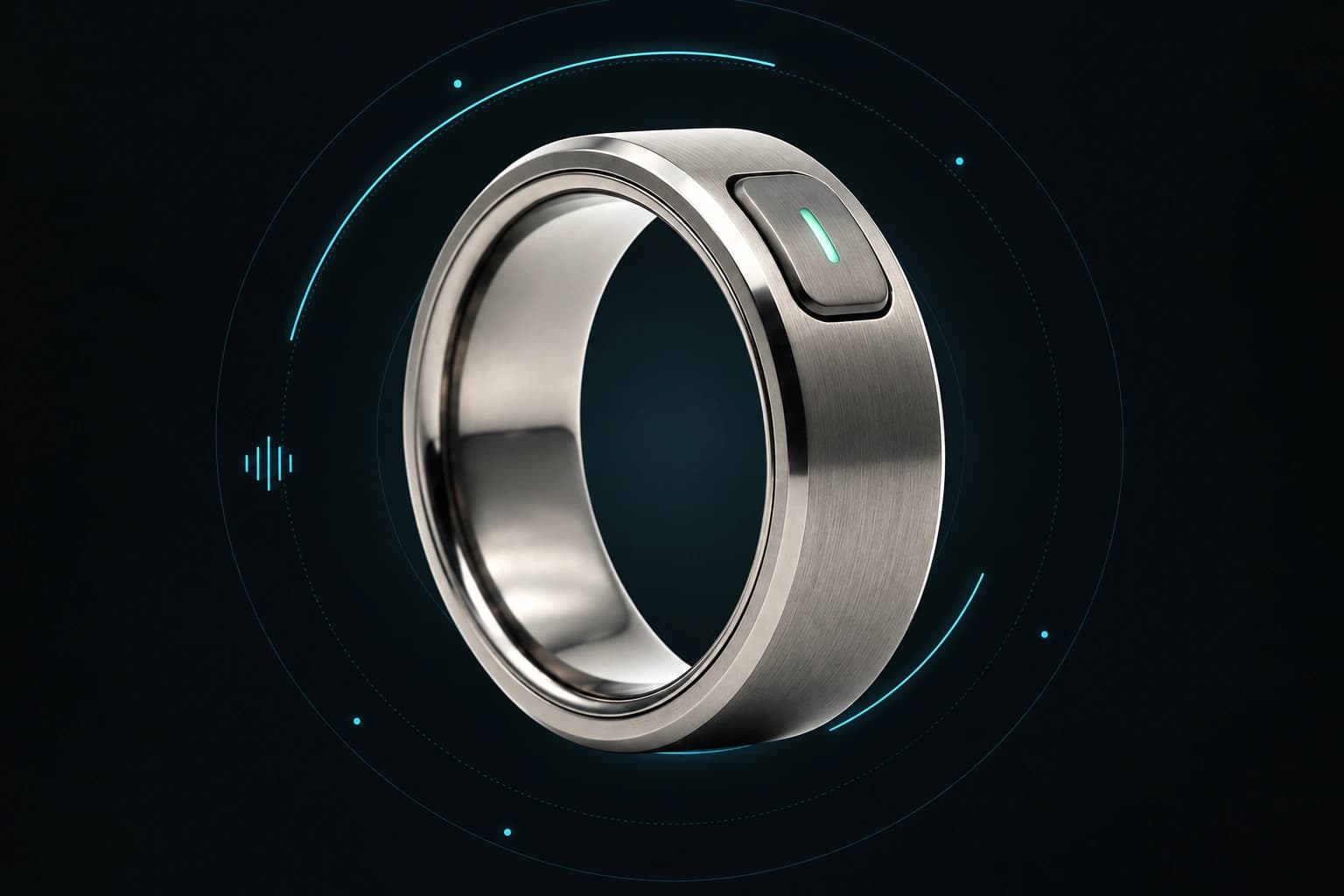
RingSense concept visual. The system and interaction flow below are proposals, not validated product capabilities.
USER UNDERSTANDING & NEEDS ANALYSIS
Learning from Molly Burke’s everyday experiences
Our team studied public material from Molly Burke, a content creator, author, speaker, and disability advocate who shares her experiences of blindness. We reviewed her website, talks, podcasts, and more than 30 social media posts to understand the accessibility barriers she describes in everyday life.
This analysis draws on published accounts rather than a direct interview. We used those accounts to identify recurring needs and review where existing tools help or leave gaps.
The environment shapes independence
A recurring theme in our analysis was that a task becomes harder when a product, service, or environment assumes everyone can see. An accessible menu or tactile product label can make the same task possible without another person’s help.
Goals & independence
Molly’s goals include working, shopping, traveling, exercising, and getting ready on her own terms. As a creator, she also needs to use social platforms, collaborate with brands, and attend events.
Across the material we reviewed, accessible design supported both practical independence and participation in the activities she enjoys. Frustration often arose when an otherwise manageable task required assistance because information or controls were presented only visually.
Five unmet needs
01
Touchscreens without feedback
Flat controls on payment terminals, treadmills, elevators, and appliances offer few tactile cues. Without accessible audio or physical feedback, an everyday task can require another person’s help.
User need Know which control is selected and receive clear confirmation of an action.
02
Unreliable access to transportation
The research describes rideshare refusals when traveling with a guide dog. Reporting an incident afterward does not resolve the immediate disruption of being unable to reach a destination.
User need Travel with a mobility aid without sacrificing independence or relying on a sighted companion.
03
Unfamiliar environments
Finding objects and understanding a new space can require extra assistance. When a guide dog is unavailable, familiar routines become harder to navigate.
User need Receive useful environmental information that complements existing mobility tools.
04
Inaccessible digital experiences
Molly uses VoiceOver and keyboard shortcuts for work and everyday tasks. Unlabeled controls and inaccessible apps or websites interrupt that workflow, even when she knows her assistive tools well.
User need Access information and controls through the tools she already uses.
05
Identifying products and reading print
Inconsistent tactile labels make it harder to distinguish products, read menus, and organize belongings. Memorizing locations works only while items stay where expected.
User need Identify items and information without repeatedly asking another person or relying only on memory.
Where existing solutions help—and leave gaps
We reviewed tools addressing payment feedback, transportation, visual assistance, digital access, and product identification. These comparisons summarize the team’s research, rather than hands-on usability testing.
Visa Accessible Tap to Phone
Support
Accessible feedback in a payment flow.
Remaining gap
Addresses a specific payment system rather than the range of touchscreens encountered throughout the day.
Uber Service Animal Self-ID
Support
Advance communication and reporting around travel with a service animal.
Remaining gap
A warning or report does not solve the immediate need for reliable transportation after a refusal.
Be My Eyes
Support
On-demand visual assistance for tasks such as reading signs and identifying objects.
Remaining gap
Requires requesting help and communicating with another person; it is not a substitute for mobility support or street-crossing judgment.
AudioEye
Support
Helps participating organizations identify and address digital accessibility issues.
Remaining gap
Access still depends on the organization implementing and maintaining changes.
WayAround
Support
Custom audio labels attached to belongings using NFC tags.
Remaining gap
Requires setting up labels for new items and does not locate a misplaced object.
Design direction
Across the five needs, the shared problem was extra effort caused by inaccessible information, inconsistent feedback, and dependence on someone else’s availability.
Provide reliable information and clear feedback that work with existing assistive tools, reduce extra effort, and give people more control over everyday tasks.
We narrowed our project pitch to one need: operating flat touchscreens that lack tactile or audio feedback. The goal is to help a user locate a control, deliberately press it, and understand whether the action worked.
FICTIONAL DESIGN PERSONAS
Four people. Different moments of friction.
These fictional profiles and storyboards explore how the concept might fit different routines, abilities, and environments. They are design assumptions, not interview participants or evidence of tested outcomes.
01
FICTIONAL PERSONA / 30
Maya Thompson
Content creator & accessibility advocate
At the gym
Start a workout on her own terms.
Maya is blind and uses a screen reader, voice commands, and a white cane. She enjoys working out, but flat treadmill controls make starting or adjusting a session dependent on someone else.
Personal background
She/her · New York City · B.A. Communications · Middle class. Blind due to retinitis pigmentosa.
GOAL
Find the treadmill controls, start a workout, and adjust settings without repeatedly asking gym staff for help.
CURRENT FRICTION
Flat touchscreens offer neither tactile boundaries nor audio confirmation. Asking for help works, but limits when and how she can exercise independently.
SCENARIO STORYBOARD
The person in their environment
Context, barriers, and how the proposed system changes the situation.
01
Arrive
Maya reaches a treadmill. Its flat screen gives her no tactile landmarks.
02
Encounter a barrier
She cannot tell where Start is or whether a press registered.
03
Regain control
The proposed ring and camera provide guidance so she can operate the controls herself.
DESIGN NEEDS
Simple, nonvisual setup and direct voice commands.
Distinct proximity and alignment vibrations.
Confirmation after a press and a reachable pause control.
SUCCESS TO EXPLORE
Start a workout and adjust the intended settings independently.
LIMITS & ASSUMPTIONS
Requires a clear camera view. RingSense would not replace the treadmill’s emergency stop controls.
PROPOSED CHANNELS Camera App recognition Haptic guidance Synthetic speech
Fictional profile informed by the team’s secondary research on inaccessible touchscreens.
PROJECT PITCH
From understanding a screen to acting on it
Our pitch proposes RingSense: a haptic ring, a camera on compatible smart glasses or a chest-mounted phone, and a smartphone app. In the revised proposal, the default interaction is automated: computer vision and optical character recognition (OCR) in the app would interpret a supported touchscreen and track the fingertip. The ring would deliver haptic cues, and the app would speak through text-to-speech. A live human assistant would be an optional, explicitly requested fallback.
01 / SENSE
Camera & app
Computer vision, text recognition, and finger tracking would identify the screen state, target control, and fingertip position.
02 / GUIDE
Haptic ring
Bluetooth commands would trigger directional vibrations, proximity pulses, and an alignment cue.
03 / CONFIRM
Screen response
After the user physically presses the screen, the app would check its response and announce the updated state.
REFINED SYSTEM PROPOSAL
What is automated, and what is human?
RingSense proposes an AI-assisted perception system with rule-based guidance. The camera supplies images; the smartphone app interprets them and decides which cues to send; the ring vibrates. The ring does not capture images or understand the interface itself.
Capture the screen and fingertip
A camera on compatible glasses or a chest-mounted phone would provide a view of both. Computer vision would locate the screen, track the fingertip, and estimate their positions in the same screen coordinate system.
Identify a supported interface
The initial scope would use a small set of prepared interface layouts with labeled controls and known screen states. OCR would read visible text and values, such as the current treadmill speed. Unrecognized layouts or states would require setup or assistance rather than an assumed button location.
Turn the goal into a target
Speech recognition would turn a request into text. For the initial prototype, supported commands would map to predefined tasks and labeled controls. A large language model (LLM) is not required for this baseline. An LLM could later help interpret more varied requests, but that is an open design option, not a chosen or implemented component.
Calculate movement cues
The app would compare the tracked fingertip with the target’s bounds to calculate direction and proximity. A rule-based mapping would translate those measurements into Bluetooth vibration commands. The ring would indicate a proposed direction, pulse faster near the target, and signal steady alignment.
Check the result after a press
The user would press the touchscreen. The app would inspect subsequent frames for the expected visible change, such as a new speed value, and use text-to-speech to report what it detected. If the screen were obscured or the change could not be verified, it would report uncertainty instead of announcing success.
DEFAULT / AUTOMATED
A synthetic voice
Routine instructions and confirmations would be generated by the app and spoken using text-to-speech. No remote person would watch the camera feed or provide the normal guidance.
OPTIONAL / LIVE HUMAN
An explicit handoff
The user could request a live assistant if automated guidance could not continue. The app would announce the switch, ask permission to share the camera view, and identify the live voice as a person. Automated directional cues would pause during the handoff. A service integration remains proposed.
What we take from existing systems
Seeing AI: visual information into speech
Microsoft’s Seeing AI demonstrates camera-based text recognition and spoken presentation. RingSense would draw on that interaction pattern to read control labels and screen values. We are not proposing to copy its code or assume access to its recognition models. Microsoft: Seeing AI
VizLens: relate the finger to labeled controls
VizLens combines crowd-labeled interface images with computer vision to describe controls beneath a user’s finger. RingSense would draw on the labeled-layout and fingertip-relative feedback approach, then explore directional ring cues and post-press state confirmation. Its initial prepared layouts would not require live crowd workers during each interaction; how new layouts are labeled remains an open question. VizLens research paper
These are proposed adaptations to evaluate. No recognition model, LLM provider, human-assistance partnership, or working end-to-end implementation is established yet.
A proposed treadmill walkthrough
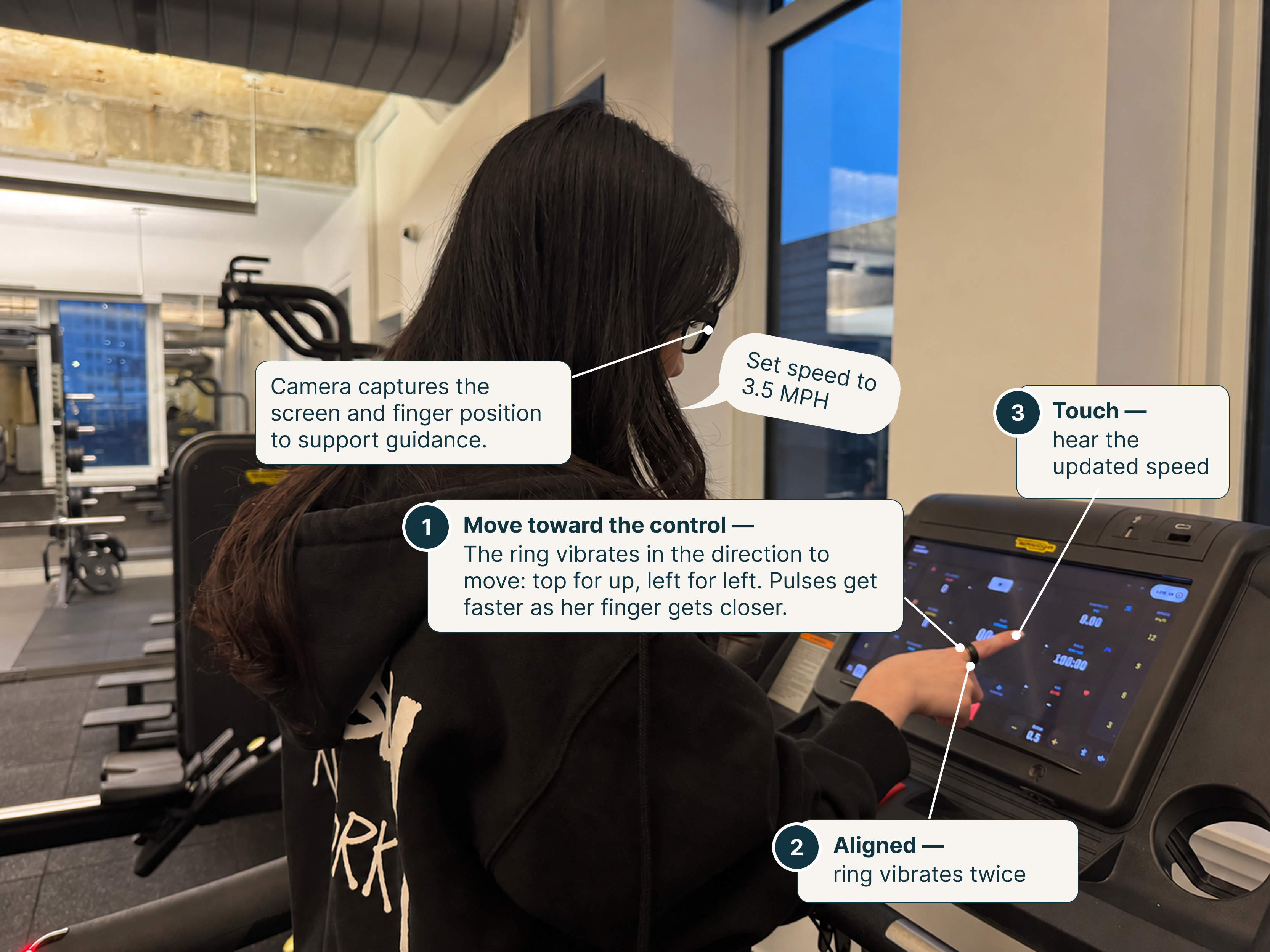
The pitch uses a goal of setting a treadmill to 3.5 mph to illustrate the interaction. This walkthrough illustrates the proposed interaction flow.
State the goal
The user asks to set the treadmill speed to 3.5 mph. The app would match a prepared treadmill layout, read the current speed with OCR, and map the supported request to the labeled speed control.
Move toward the control
Directional vibrations would suggest where to move the finger. Pulses would speed up nearer the target and slow down when moving away.
Confirm alignment
Two pulses would signal steady alignment, accompanied by the app’s synthetic voice saying “aligned with speed up.”
Press deliberately
The user would make the physical press. The app would use OCR to check the displayed speed after the press. Its synthetic voice would announce the detected value, or say it could not verify the change.
Pause or ask for help
A ring button would repeat or pause instructions. If tracking were lost, guidance would pause and announce that the finger could not be located. If requested, a separate, announced handoff would connect a live human assistant after permission to share the camera view.
Feedback that follows the action
Proposed feedback mapping
State
Feedback
Direction
Vibration on the corresponding side of the ring.
Approaching the target
Progressively faster pulses.
Moving away
Slower pulses, with spoken guidance available.
Steady alignment
Two pulses and an alignment announcement.
After a press
Text-to-speech confirmation only after the expected visible change is detected; otherwise report uncertainty.
Finger not detected
Pause guidance and announce the tracking loss.
The intent is to make movement guidance available through touch while using speech for context and confirmation. The cues still need to be evaluated for comfort, distinguishability, and accuracy.
The app, access, and privacy
The proposed mobile app covers three areas: hardware connectivity, an active guidance view with finger tracking, and customizable device settings. The pitch calls for VoiceOver and TalkBack support and spoken output through the phone or compatible glasses.
Process locally where possible. Prioritize on-phone image processing without saving video by default.
Keep the user in control. Allow the camera and guidance to be paused at any time.
Ask before sharing. Share images with a human assistant or cloud service only with the user’s permission.
A connection to a service such as Be My Eyes is a proposed integration, not an existing RingSense partnership.